Document management system for law firms — built in, not bolted on

The document management system law firms actually use.

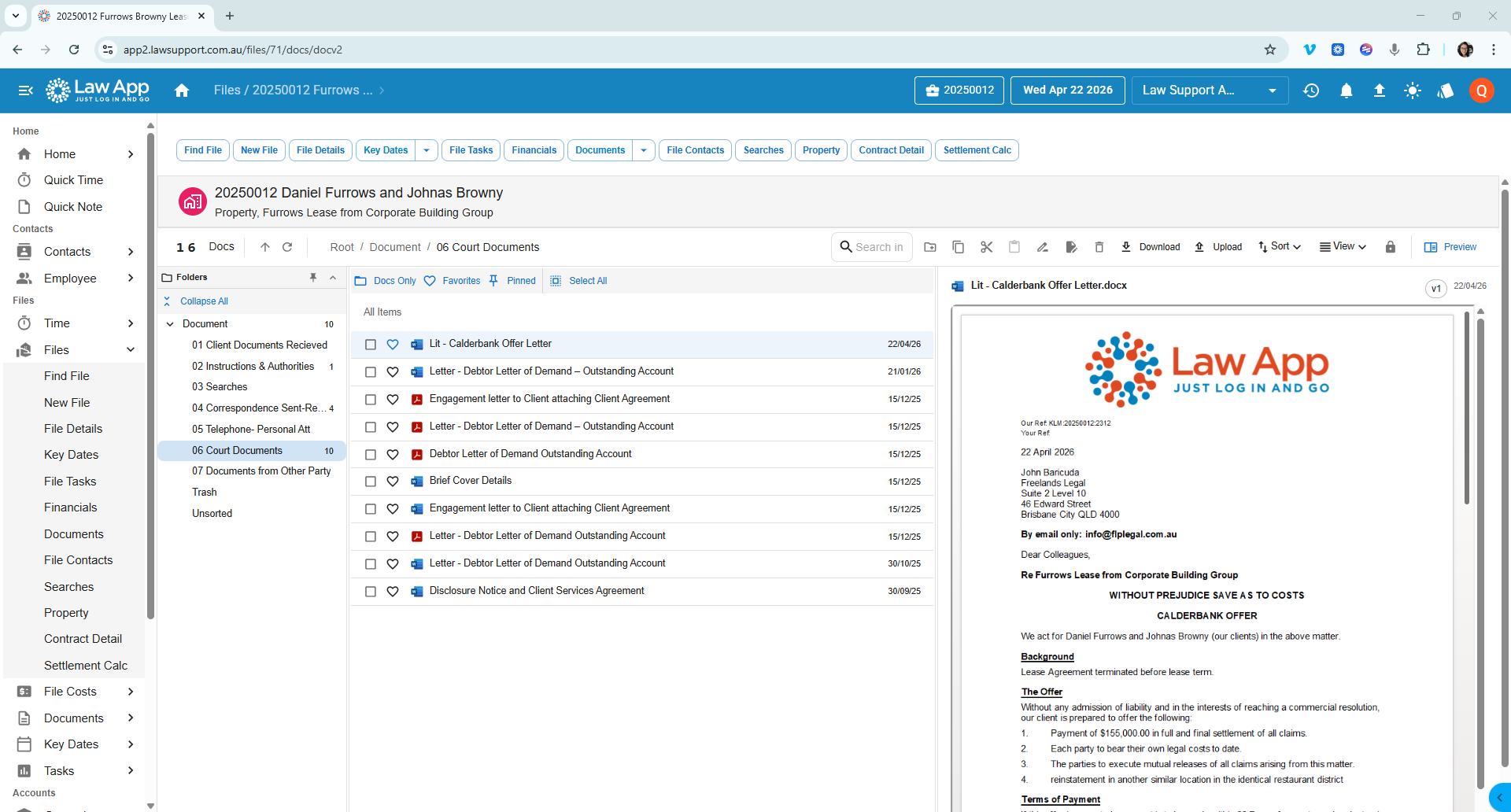
Law App includes a complete document management system for law firms — explorer-style navigation, uniform folder hierarchy, favourites, pinned documents, versioning, and PDF preview. All built into your practice management software. No separate licence. No third-party integration. One subscription, one system.

Explorer-style navigation
Favourites & pinned docs
Version history
PDF preview built in
No separate DMS licence
Law App — document management folders view 🔍
3Hierarchy levels
PDFPreview built in
FullVersion history
OutlookEmail integration
$0Separate DMS cost
Why it belongs inside the platform

When document management lives inside your practice software, things stop falling through the gaps.

The cost of inconsistent document filing in a law firm is rarely measured directly, but it shows up everywhere — in write-offs that never get recovered, in time spent searching for a letter that was saved in the wrong folder, and in the quiet duplication of work when a fee earner creates a document that already exists two levels deep in another matter. These are the kinds of losses that accumulate slowly and never appear on a single invoice.

Bolting a separate document management system onto practice management software only adds to the problem. It introduces double entry, broken links between documents and their matters, and a second interface that staff learn to avoid. The more friction there is between filing a document and doing the actual legal work, the more likely it is that documents end up in the wrong place — or nowhere at all.

Law App takes a different approach. Documents, matters, trust accounting, general accounting, and billing all live in the same system. When a document is saved, it is on the matter. When a fee earner opens a file, the documents are already there — alongside the trust balance, the time entries, and the correspondence. Nothing needs to be synced, imported, or reconciled across platforms. For fee earners and support staff alike, that changes the day-to-day experience of running a file.

Folder structure

Every document in its place. Every time.

Law App uses a uniform three-level folder hierarchy — set once at the firm level, applied consistently across every matter of the same type. Fee earners always know where to find a document, regardless of who created the matter.

Inconsistent filing is one of the most common — and most expensive — problems in law firm document management. When fee earners can't find a document quickly, that time rarely gets written off voluntarily. Law App solves this with a uniform three-level folder hierarchy, set once at firm level and applied automatically across every matter of the same type. It's the kind of document management system law firms need: structured enough to enforce consistency, flexible enough to handle anything specific to a file.

Level 1

Firm Level

The master folder structure is defined at the firm level. Every matter of the same type inherits this structure automatically when the matter is opened.

Client Documents Received
Instructions & Authorities
Searches
Correspondence
Level 2

Matter Type Level

Matter type folders extend the firm structure with folders specific to that area of practice — property, litigation, family, wills — each with their own additional folder sets.

Telephone — Personal Att
Court Documents
Documents from Other Party
Trash
Level 3

Individual Matter

Within the standard structure, individual folders can be added at the matter level for anything specific to that file — without disrupting the firm-wide hierarchy.

Expert Reports
Counsel Advice
Unsorted

The cost of poor document management in a law firm is not always visible on a P&L. It shows up as write-off on time-recording reports, in duplicate documents discovered at the last minute, and in the quiet frustration of staff who know the system does not work but have stopped saying so. A uniform folder hierarchy is the simplest fix — and the one most firms overlook when evaluating practice management software.

Why it matters

Most firms pay extra for document management. Law App firms don't.

Many legal practice management platforms treat document management as an add-on — a separate licence, a separate cost, a separate system. Law App includes it as standard.

Law App

DMS included

Explorer-style navigation, folder hierarchy, version history, email saving, PDF preview, favourites, pinned documents, bulk actions — all included in the standard per-file subscription. No separate licence. No storage fees. No third-party integration to manage.

Most competitors

DMS as add-on

Many platforms require a separate document management system — either a built-in module at extra cost, or a third-party integration like NetDocuments or iManage. That means a separate licence, separate storage fees, and often a separate login or interface to learn.

The result

One system wins

When your document management system lives inside your practice management software, everything is in one place. No switching between systems. No duplicate filing. No wondering which platform has the latest version. Every document, every email, every version — all on the matter, all the time.

Why it matters

Most firms pay extra for document management. Law App firms don't.

Many legal practice management platforms treat document management as an add-on — a separate licence, a separate cost, a separate system. Law App includes it as standard.

Law App

DMS included

Explorer-style navigation, folder hierarchy, version history, email saving, PDF preview, favourites, pinned documents, bulk actions — all included in the standard per-file subscription. No separate licence. No storage fees. No third-party integration to manage.

Most competitors

DMS as add-on

Many platforms require a separate document management system — either a built-in module at extra cost, or a third-party integration like NetDocuments or iManage. That means a separate licence, separate storage fees, and often a separate login or interface to learn.

The result

One system wins

When your document management system lives inside your practice management software, everything is in one place. No switching between systems. No duplicate filing. No wondering which platform has the latest version. Every document, every email, every version — all on the matter, all the time.

What's included

Everything a document management system should do. Nothing extra to buy.

Document management is fully included in Law App's standard per-file subscription. No separate DMS licence, no storage fees, no integration required.

Law App's document management system for law firms covers every function a busy practice needs — from day-to-day filing through to version control, email integration, and bulk document handling. It is included in the standard per-file subscription. See how Law App is priced →

🗂️

Explorer-Style Navigation

Navigate documents exactly like Windows Explorer — expand folders, drill into subfolders, and move between sections of the matter without losing your place. Familiar, fast, and intuitive.

❤️

Favourites & Pinned Documents

Mark any document as a favourite or pin it for quick access. Filter the document list to show only Favourites or Pinned items — the documents you need most are always one click away.

🔄

Version History

Every save creates a version. Previous versions are retained and accessible at any time. Compare versions side by side to see what changed and when. Nothing is ever permanently overwritten.

🔒

Edit Protection

When a document is being edited, it is locked to that user. No one else can open it for editing simultaneously — preventing overwrite conflicts and protecting document integrity across the team.

📄

PDF Preview

Preview any document as a PDF directly in the browser without downloading. Review, scroll, and zoom in the built-in viewer before deciding whether to download, email, or print.

📧

Email Direct from Law App

Email documents directly from the matter without downloading first. Convert to PDF on send, select the recipient from the matter contacts, and the sent email is saved back to the file automatically.

📥

Save Emails to Matter

Save incoming and outgoing emails directly to the matter from Outlook. Attachments save alongside the email body. Every communication lands in the right folder on the right file.

📦

Drag, Drop & Bulk Actions

Drag files into folders, select multiple documents, and perform bulk actions — download, move, copy, or delete. Managing large matters with hundreds of documents is fast and straightforward.

🔍

Search & Smart Categorisation

Search across all documents on a matter by keyword. Document tagging and AI-assisted categorisation for smarter indexing is currently in development — coming in the next few months.

Enhanced search — coming soon
Integration-free

One system. Not three systems pretending to be one.

Most legal practice management platforms in Australia require firms to run a separate document management system, a separate accounting package like Xero or MYOB, and a separate billing tool — each connected via API, each with its own subscription, each a potential point of failure. When something breaks between them, the firm carries the cost. When data falls out of sync, the firm carries the risk.

Law App has trust accounting, general accounting, billing, document management, and matter management all built into the same platform. No integrations to maintain. No duplicate data entry. No separate licences. One system, one subscription, one login — and every part of it talking to every other part without a middleware layer in between.

Law App

DMS included

Full document management system included in the per-file subscription. Nothing extra to buy.

Most competitors

DMS as add-on

Document management charged as a separate module, or pushed to a third-party integration.

The result

One system wins

When documents live in the same system as matters and accounting, nothing gets lost between the gaps.

Common questions

Questions about Law App document management

What firms ask before they switch.

What document management system is built into Law App?
Law App includes a complete document management system for law firms as part of the standard per-file subscription. It features explorer-style folder navigation, a uniform three-level folder hierarchy, favourites, pinned documents, full version history, edit protection, PDF preview, email saving from Outlook, and bulk document actions. No separate DMS licence or third-party integration is required — it is all built into the one platform.
Do I need a separate document management system if I use Law App?
No. Law App's document management system is fully built in — not a bolt-on or integration. It covers folder hierarchy, version control, email saving, PDF preview, favourites, pinned documents, and bulk actions. There is no separate DMS licence, no additional storage fees, and no third-party software to manage. Everything lives inside the same platform you use for matters, billing, and accounting.
Where is Law App document data stored?
All Law App data, including documents, is stored on Microsoft Azure Australia East infrastructure. Data remains in Australia at all times — this is not optional or configurable, it is the default for every firm. Law App is built and supported by Law Support Australia in Brisbane.
How is document management organised in Law App?
Law App uses a three-level folder hierarchy — firm level, matter type level, and individual matter level. The firm-level structure is defined once and applied consistently across every matter of the same type. Fee earners always know where to find a document, regardless of who set up the matter.
Does Law App have document versioning?
Yes. Law App maintains a full version history for every document. Previous versions are retained and accessible, and documents can be compared across versions. Edit protection prevents two users editing the same document at the same time.
Can I save emails and attachments to a matter?
Yes. Law App integrates with Outlook to save emails and attachments directly to the matter. Saved emails appear in the document list alongside other matter documents, keeping all communications and documents in one place.
Can Law App convert documents to PDF?
Yes. Documents can be converted to PDF and emailed directly from Law App. The built-in PDF preview lets you review documents in the browser before sending — no need to download first.
Does Law App have favourites and pinned documents?
Yes. Individual documents can be marked as favourites or pinned for quick access. The Favourites and Pinned filters in the document list let you surface the most-used documents on a matter instantly — useful for frequently referenced precedents, agreements, and key correspondence.
Talk to the team

See Law App's document management system in action.

Law App's document management system for law firms is best understood by seeing it run on a real matter. Book a demonstration and we'll walk you through the folder hierarchy, favourites, versioning, email saving, and PDF preview on a live file. About 20 minutes. No sales pitch.

Full DMS included — no separate licence
Per file pricing — no per-user charges
Single year contracts only
Data on Azure Australia East — always
Caelun Richardson-Lester
Account Executive
0488 899 408 caelun@lawsupport.com.au Book a demonstration
Law App screenshot