Law App includes full legal billing built in — time recording, rate codes, quick time entry, and invoicing. Every billing method your firm uses, all in one place.
Whether your firm bills by time, by value, per unit, or per item — Law App handles it. Rate codes and employee rates are set once and applied automatically to every entry.
Bill by time with units recorded against each timesheet entry. Set hourly rates at the firm level, employee level, or override per matter. Units calculate automatically from time entered.
Bill a fixed value for the matter or for a specific piece of work regardless of time spent. Useful for conveyancing, wills, and fixed-fee matters where the value is agreed upfront.
Bill by the unit — documents drafted, searches conducted, items reviewed. Set a rate per unit and Law App calculates the invoice amount automatically from the units recorded.
Bill for specific items as they occur — court appearances, file openings, disbursements. Each item is recorded individually and pulled through to the invoice with the correct rate.
Fee on-charging: Law App's per-file opening fee can be on-charged to the client as a disbursement on the matter. For firms that recover file costs from clients, the software pays for itself directly from the file it relates to.
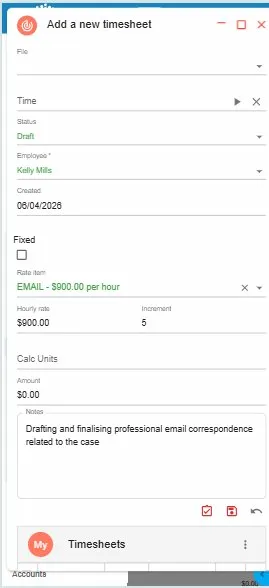
The longer the gap between doing the work and recording the time, the more billable time gets lost. Law App's Quick Time entry is designed for speed — select the file, pick the rate item, enter units, add a note, done.
Law App is 100% web-based, which means Quick Time entry works on any device — desktop, laptop, tablet, or phone. A fee earner finishing a call can record the time immediately without going back to their desk.
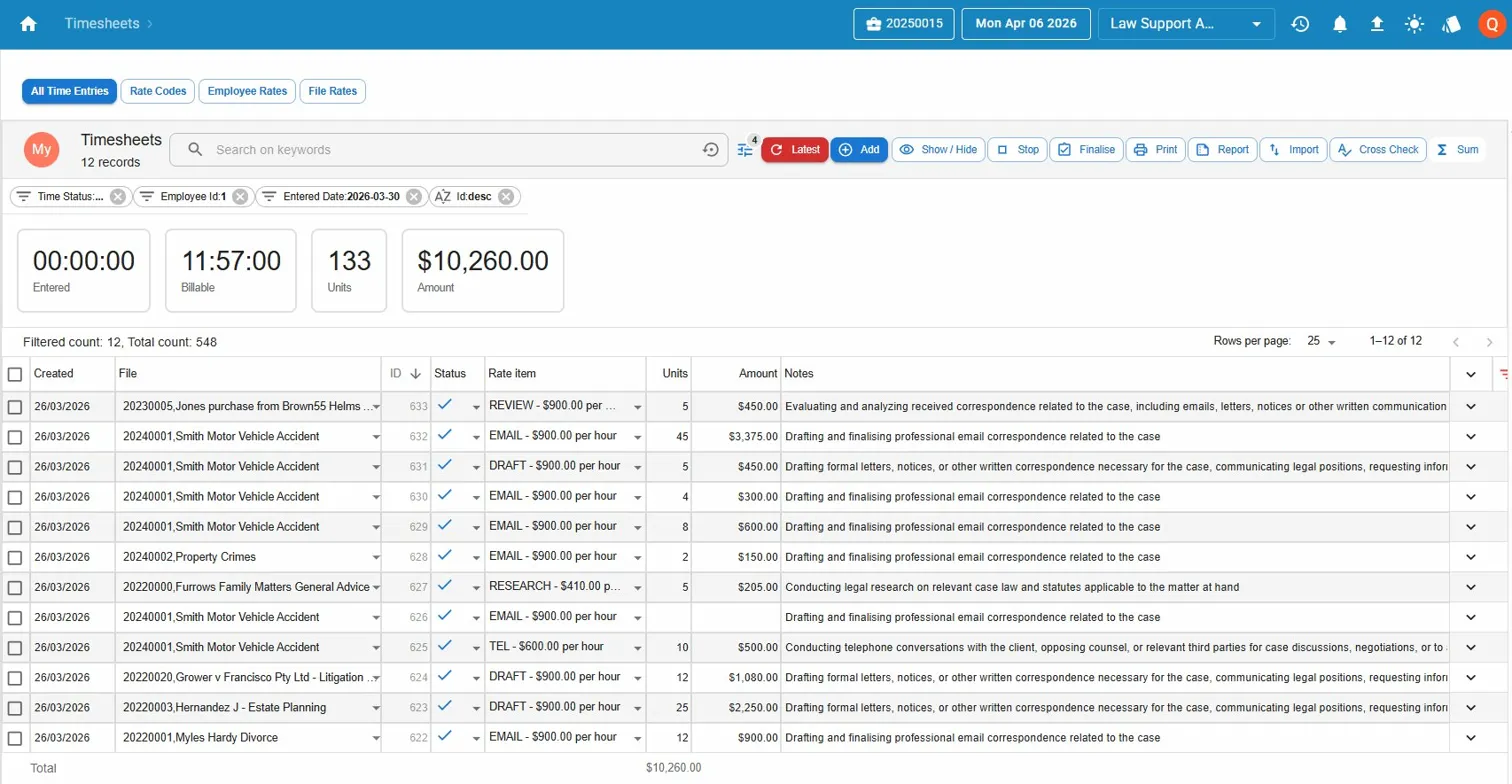
Rate items like EMAIL, DRAFT, TEL, and RESEARCH are pre-configured with your firm's hourly rates. Select the rate item and the rate populates automatically. Units convert to dollars as you type.
The Law App timesheet list gives a real-time view of all time entries — filtered by employee, date, matter, or status. Billable hours, units, and total amounts are summarised at the top so nothing gets missed before invoicing.
Time entries recorded throughout the month sit in the timesheet list ready to be invoiced. When it's time to bill, select the entries for the matter, review the narrative, and generate the invoice — all without leaving Law App.
The invoice pulls the rate, units, amount, and notes directly from the timesheet entry. No re-entering. No copying between systems.
What firms ask before they switch.
Call or email Caelun to book a time. Demonstrations are conducted by Kelly Mills — Law App's implementation specialist. The session covers time recording, rate codes, Quick Time entry, and invoicing from timesheets. About 20 minutes.